31
Windows 7 and Vista Checklist
The following instruction is written for NeoTicker 4.20 or earlier releases only.
As of NeoTicker 4.30, it is fully Windows 7 and Vista compatible and the instructions here are not applicable in general.
If you plan to upgrade to Windows Vista, make sure you have the following items ready,
1. Latest release of NeoTicker (4.10 build 50 or higher)
You can download that from our support page
2. HASP driver from Aladdin that is Vista compatible
You can find the right driver from Aladdin here
3. An image backup of your computer before applying the upgrade
In case Vista is not working for you, you can always restore your computer to this backup image.
Utilities like Ghost from Symantec are designed for this task.
4. Special Vista drivers for all your special hardwares
If you have hardware devices that are not listed as Vista compatible, make sure you obtain the proper drivers before applying the upgrade.
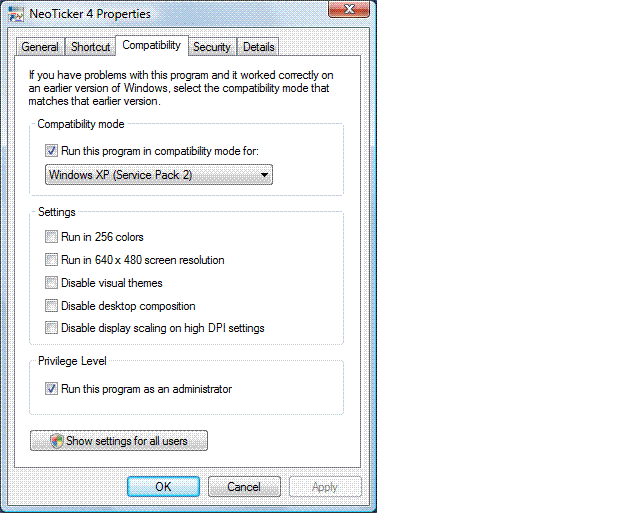
5. Enable WinXP SP2 compatible mode and Administrator Privilege
If you cannot launch NeoTicker successful, set the application property to WinXP SP2 compatible mode and have the Administrator Right enabled.
To access application properties, right click on NeoTicker desktop icon and select properties from popup menu.
See the following screenshot if you are not sure what I mean,
6. Disable UAC (User Account Control)
If you need to link NeoTicker to Excel through DDE/RTD, or working with automation tasks, it is best to turn off UAC.
To turn off UAC, open Windows Control Panel, look under the User Accounts and Family Safety section. Choose the User Accounts item. You should see an item called Turn User Account Control on or off. Select the item and follow the on screen instructions to disable the option.
If you encounter problem using NeoTicker, contact support@tickquest.com
Share: digg | del.icio.us | Technorati | StumbleUpon